Posts mit dem Label C# werden angezeigt. Alle Posts anzeigen

5. Dezember 2016

JsonPath

Any time a piece of my software receives a JSON message it must dive into the JSON and extract parameters. Sometimes the JSON is deeply nested and parameters are buried inside arrays of objects of arrays.

I want to access these parameters quickly without dissecting the JSON by looping and if-ing through the layers. In other words: I want single line expressions to dive into JSON and extract values.

You can call it XPath for JSON, but in a language integrated and compiled way, which is much faster, than XPath and supported by Intellisense (autocomplete).

GitHub project: https://github.com/wolfspelz/JsonPath
NuGet package: https://www.nuget.org/packages/JsonPath

Example: extract the 42 from:

var data = "[ '1st', '2nd', { 'aString': 'Hello World', 'aNumber': 42 } ]"

... parse it:

var json = new Node(data);

... extract it:

int fourtytwo = json[2]["aNumber"];

Invalid keys do not throw exceptions. They return 0 (zero), "" (empty string), or empty list:

int zero = json[1000]["noNumber"];

Of course, you can foreach a dictionary (aka JS object):

foreach (var pair in json[2]) {}

And iterate over a list (aka JS array):

for (int i = 0; i < json.Count; i++) {
    string value = json[i];
}

You can even LINQ it:

json[2].Where(pair => pair.Key == "aNumber").First().Value

and:

(from x in json[2] where x.Key == "aNumber" select x.Value).First()

Now get me the 50 from this JSON:

var data = "[ { 
        aInt: 41, 
        bLong: 42000000000, 
        cBool: true, 
        dString: '43', 
        eFloat: 3.14159265358979323 
    }, { 
        fInt: 44, 
        gLong: 45000000000, 
        hString: "46"
    }, { 
        iList: [ 
            { jInt: 47, kString: '48' }, 
            { lInt: 49, mString: '50' }
        ], 
    }
]";

I can do it in a single line, no foreach no if:

var fifty = json[2]["iList"][1]["mString"];

Other people had the same idea years ago: http://goessner.net/articles/JsonPath/. But there does not seem to be a C#/.NET implementation yet. So here it is: GitHub, nuget.

_happy_jsoning()


25. Januar 2016

Compile on Save for Typescript in Visual Studio with Gulp

The standard way to develop with Typescript in Visual Studio 2015 (ASP.NET 5, MVC6) is to create a so called "virtual project" in a folder. That's a Typescript project inside a Web-C# project. This embedded Typescript project automatically compiles Typescript files on build.

Javascript files can be changed and reloaded while a project is running (debugging). But new Typescript code will not be available until the project is restarted.

The better way is to let gulp do the compilation. But let's start with the standard way (the few steps you do here are required later anyway).

Setup the virtual Typescript project:

  • Add a folder for Typescript scripts to the Web project, e.g. "./Scripts"

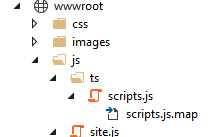
  • Put a tsconfig.json file into the folder (it contains "outFile": "../wwwroot/js/ts/scripts.js") which bundles all generated Javascript in a single file scripts.js in the "wwwroot/js/ts" folder.

  • Add a folder "ts" in "wwwroot/js". This is the Typescript compiler destination folder. Compiling into a sub folder of "wwwroot/js" has the advantage that generated Javascript will be minimized like all other Javascript inside "wwwroot/js" by the the Visual Studio build step. This is nice for Release builds. For our debug session we use the non-minimized "wwwroot/js/ts/scripts.js" in the HTML.

  • Add your *.ts files to the "./Scripts" folder

  • A Visual Studio build will generate "scripts.js" and "scripts.js.map" (.map for debugging Typescript source code in IE or at least watching Typescript in Chrome).

  • Add a reference to "scripts.js" in your HTML like this: <script src="/js/ts/scripts.js"></script>.
But:

The *.ts files are only compiled and bundled when the project is built. No edit/save/reload-browser cycle. The debug session must be stopped to make new Typescript code available for browser reload.

There is a solution.

Let gulp do the Typescript compilation and trigger the compilation with a gulp file watcher.

Here is the code: https://gist.github.com/wolfspelz/d494bd8a1ba56ff81c91

Here are the steps:
  • Add a Scripts folder for Typescript files (as before for the virtual project).

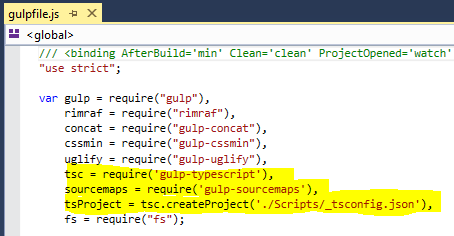
  • Add a file "_tsconfig.json" to the Scripts folder (can be any name, but the name appears in "gulpfile.js"). I just renamed my existing "tsconfig.json" to "_tsconfig.json" to hide it from Visual Studio and re-use it with gulp-typescript.

  • Add gulp modules by editing "package.json". Visual Studio should download lots of node packages.


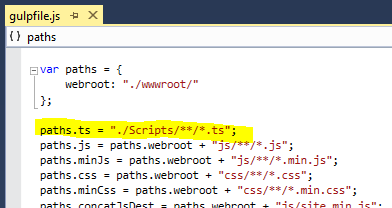
  • Add gulp tasks by editing "gulpfile.js" in three places:
  • 1. Add gulp requires at the top.

  • 2. Add the Typescript source path further down.

  • 3. Add two tasks.

  • Saving "gulpfile.js" should show two new tasks in the Task Runner Explorer: "compile-ts" and "watch".

  • Check that the "compile-ts" task works. Double click "compile-ts" in the Task Runner Explorer. It should compile and combine all Typescript into "scripts.js" in the same place as before with the virtual project.

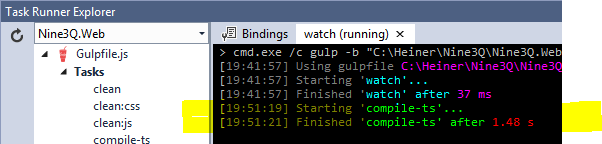
  • Once "compile-ts" works, we can automate the Typescript compilation with the new "watch" task. In the Task Runner Explorer, bind the "watch" task to the "Project Open" event. Right-click "watch"  => Bindings => Project Open. Result:

  • You might check if the "watch"/"compile-ts" workflow works by starting "watch" and editing/saving a Typescript file in the Scripts folder.
  • Close/Open the project/solution or just stop/start Visual Studio. The "watch" task should be running after starting Visual Studio settles down.

  • Delete the "scripts.js" file from earlier "compile-ts" runs.

  • Edit/save a Typescript file. The "watch" task should start "compile-ts":

  • Check if the "scripts.js" is generated along with it's "scripts.js.map".

  • Start a debug session. 
  • Change Typescript code. Reload browser.
  • Voilà
  • The default behavior of Visual Studio for Typescript without a virtual project (and a proper "tsconfig.json") seems to be compile-on-save.It generates a Javascript for each Typescript in the "Scripts" folder. We can just ignore them. Maybe nice to check the generated Javascript code.

_happy_gulping()

PS: There could be a clean-ts task

Thanks to

14. Dezember 2014

ConfigSharp - Scripting Configuration in C#

ConfigSharp (github, nuget)

Config files are C# source files, managed by Visual Studio like any other code file: intellisensed, refactorable, resharpered, syntax checked, compiled, type safe.

Write real code with control structures and classes in config files. Include other local or remote (HTTP) config files.

No more key-value lists of string based app settings in XML. These settings are typed properties of CLR objects, even aggregated types. No more workarounds for complex settings, which do not fit properly in strings.

Devops friendly, because admins can program their config files. Developers can document settings with examples in their own code, which also is the admins's config file.

BTW: this is what everyone (PHP, Python, RoR) does. Configuration in your main language.

Example: 

Program.cs
static void Main(string[] args)
{
    var config = new MyConfig();
    config.Include("ConfigFile.cs");
    ...
    var prop1 = config.SomeProperty;
    // or
    var prop2 = Config.Global.SomeProperty;
    var prop3 = App.Settings.SomeProperty;
    var prop4 = AppSettings.Get("SomeProperty", "default");
}

public class MyConfig : ConfigSharp.Container
{
    public string SomeProperty { get; set; }
    public int OrAsMemberVariable = 41;
    public DateTime PlainOldCLRTypes;
    public NLog.Config ComplexAggregatedTypes;
}
ConfigFile.cs
namespace MyProgram.Configuration // any namespace
{
    class ConfigFile : MyProgram.MyConfig // Derived from your config class
    {
        public void Load()
        {
            SomeProperty = "42";
            Include("OtherConfigFile.cs");
        }
    }
}

More on github and nuget.

_happy_configuring();

Tags: Config, Roslyn, C#, Script, Scripting, CLR, Configuration, File, HTTP, Remote, C# Script, Devops

Rant: XML config files. Static, unreadable XML hell. What where they thinking? Anyone is configuring their app in the native project language. Only poor high level language coders use XML or ini files. Even worse: generating XML config files for different environments with XSLT transformations from master XML config files. Are they out of their mind? Web.config Transformation Syntax for Web Application Project Deployment. <add... xdt:Transform="Replace" xdt:Locator="Condition(@name='oldname' or @providerName='oldprovider')"> --- Condition(), or, @, What? There is already a proven syntax: it is called C#. There is already a good transformation: it is called compiler. This must end now, once and for all.

25. September 2014

Simple Token Authentication for .NET Web API

A simple way to use tokens in HTTP requests for authentication in Web API with [Authorize] attribute including Identity, Principal and Roles. 

Sample code: https://gist.github.com/wolfspelz/a080601bbd3988782701


Valid tokens are stored statically in Azure-CloudConfigurationManager. This can be changed easily to check a real database of tokens.

_happy_authenticating()

21. Mai 2014

JsonTree Library and Nuget Package for Quick and Easy JSON Parsing


Any time a piece of my software receives a JSON message it must dive into the JSON and extract parameters. Sometimes the JSON is deeply nested and parameters are buried inside arrays of objects of arrays.

I want to access these parameters quickly without dissecting the JSON by looping and if-ing through the layers. In other words: I want single line expressions to dive into JSON and extract values.

You can call it XPath for JSON, but a language integrated compiled way, which his much faster, than XPath and supported by IntelliSense (autocomplete).

Example JSON: 

[ "first", { "aString": "HelloWorld", "aNumber": 42 } ]
Extract the value 42:
var fourtytwo = json.List[1].Dictionary["aNumber"].Int;
The JsonTree library basically maps JavaScript Arrays to C# Lists and a JavaScript Objects to C# Dictionaries. It is then very easy to enumerate lists of dictionaries of lists, etc as single line expressions to extract values. Also, if looping is required, it is done on well known container classes List<...> and Dictionary<string,...>.

A more complex example:
var data = "[ { aInt: 41, bBool: true, bLong: 42000000000, cString: "43", dFloat: 3.14159265358979323 }, { aInt: 44, bLong: 45000000000, cString: "46" }, { aList: [ { aInt: 47, bString: "48" }, { aInt: 49, bString: "50" } ], bMap: { aInt: 51, bString: "52" } } ]";
Extracting the 50 as integer number. The 50 is a string value in a JS object (of key "bString") in a JS array (as second element) in a JS object (with key "aList") in a JS array (as third element).
var fifty = new JsonTree.Node(data).Array[2].Object["aList"].Array[1].Object["bString"].Int;
JsonTree uses either JavaScript notation with Array and Object as keywords or C# notation with List and Dictionary as keywords. Choose whatever you like more. 

The same as above in C# notation:
var fifty = new JsonTree.Node(data).List[2].Dictionary["aList"].List[1].Dictionary["bString"].Int;
Other examples:
var pi = new JsonTree.Node("{a:3.1415927}").Dictionary.First().Value.Float;

var pi = new JsonTree.Node("{a:3.1415927}").Dictionary["a"].Float;
You can use JsonTree as nuget package: https://www.nuget.org/packages/JsonTree/

Or check out the source code on Google code: https://code.google.com/p/json-tree/

JsonTree also includes a flexible JSON serializer which is used to create a easy to read debug view of the JSON structure. Browsing the JSON in debug mode is a real highlight. 


The serializer can also be used to add elements to a deserialized JSON node and re-serialize.

_happy_parsing()

PS: I know that I could use NewtonSoft JSON with C# dynamic and JObject
PS: I know that I could use LINQ

I like this way, because it relies only on plain old CLR objects, List and Dictionary.

4. August 2013

Mocking Controller Context with HTTP Request for Unit Testing ApiController of ASP.NET WebApi

For a new project I am using ASP.NET Web API. Web API is a great way to implement REST services.

Web API makes many things easier, but there is one thing missing: simple unit testing of controllers. You can definitely call controller methods like Get() and Get(id). But it is not easy to prepare the controller's server context so, that Request.CreateResponse() works correctly. Also, if you want to return the URI of a newly created (Post-ed) item, then a lot of wiring has to be done around ApiController's properties Request and ControllerContext,

Here is my solution: I am extending ApiController with a MockRequest function, which sets up the routing stuff like routes, route data, request URI. The goal is, that the controller method can:
- check the request URI including the query,
- create URLs using the route template,
- create a HttpResponseMessage as result.

The MockRequest method is called like:
var controller = new ProductsController(productRepository);
controller.MockRequest(HttpMethod.Get, new { controller = "products", id = 1 });
Product result = controller.Get(1);
Assert.Equal(result.Name, "Tomato Soup");
Implementation:
public static class ApiControllerExtensions
{
  public static void MockRequest(this ApiController self, HttpMethod httpMethod, object routeValues)
  {
    var routeValueDict = new HttpRouteValueDictionary();
    foreach (var prop in routeValues.GetType().GetProperties()) {
      routeValueDict.Add(prop.Name, prop.GetValue(routeValues, null));
    }
    var config = new HttpConfiguration();
    var request = new HttpRequestMessage { Method = httpMethod, RequestUri = new Uri("http://localhost/") };
    var route = config.Routes.MapHttpRoute("DefaultApi", "api/{controller}/{id}", defaults: new { id = RouteParameter.Optional });
    var routeData = new HttpRouteData(route, routeValueDict);
    self.ControllerContext = new HttpControllerContext(config, routeData, request);
    self.Request = request;
    self.Request.Properties.Add(HttpPropertyKeys.HttpRouteDataKey, routeData);
    self.Request.Properties[HttpPropertyKeys.HttpConfigurationKey] = config;
    self.Request.RequestUri = new Uri(self.Url.Link("DefaultApi", routeValues));
  }
}

Note: the argument routeValues also takes additional properties, which are automatically converted to query parameters, because they do not fit the route template. Just as it should be.

Note: the route template is fixed to "api/{controller}/{id}". If you have a different template, change it or make it a parameter of MockRequest. I did not want too many variables, because my project only has /api/controller[/id] URIs.

Note: don't ask me why the request is set up with a default URI "http://localhost/", then later the RequestURI property is set explicitly. Without the prior "http://localhost/", self.Url.Link() always returns null.

Note: there is more to do if you want to unit test model validation as well. See Unit test WebAPI Controllers with Model Validation. Looks good, but does not compile with my NET 4.0. If you also want to check the formatting, then you might need to talk to an in memory HTTP server (which will also include the model validation).

_happy_routing()

3. November 2009

mod_mono Control Panel Extension

Just added a list of URLs to the mod_mono Control Panel (CP).

The Apache module mod_mono has a small control panel. The CP has some (actually very few) control features. You can see how many requests are currently processed, how many are waiting and you can restart the server process (the mono worker process, not the web server).

It can be enabled by

  1. <Location /mono>
  2. SetHandler mono-ctrl
  3. </Location>
Then go to http://your.host/mono. Unfortunately, it only shows how many requests are in work. I was missing information which requests are processed and waiting. I need the URLs. I want to know which ones take much time and which are blocking the server under high load.

So, I extended the CP to show a simple list of currently processed and waiting URLs.
  • First column is the request serial number.
  • The second colum is the processing time in seconds.
  • The third column is the URL with query.
Waiting requests are also listed. This happens only if the max processing limit is exceeded and requests wait (not in the screenshot). The waiting list shows the wait time instead of the processing time.

All data is stored in a shared memory segment.

BTW: mod_mono is programmed in C with not too much structure. No offense guys. I am very thankful for it. Great work. I know, it's open source. I should not complain, but improve it (which I did).

Why did I extend it? 2 reasons:
  1. I believe that an operator of a real service needs more information about what is going on than just the number of requests. We used apache server-status heavily. This is the same for mono.
  2. Flooding the server with dozens of integration tests, which spawn 200 backend requests each, stalled the server. I was afraid, that mon_mono has a problem under high load.
Once I knew the URLs, I could clearly see, that mod_mono is fine. It was just a normal deadlock situation where an frontend request tried to make a backend call via HTTP and could not get a free slot. Processing slots are limited by the thread pool. It can be increased, but there must be a hard limit. Allowing unlimited threads would make the server unusable under load, whereas deadlock situations can be avoided.

All slots are occupied by requests which wait for completion of backend requests, which do not find a free slot. Not a mod_mono issue. The situation has been resolved by splitting frontend and backend into separate mono applications. This is the normal configuration of a real multi-tier system, anyway.

The patch:

  1. % cd mod_mono-2.4.2/src
  2. % wget http://wolfspelz.de/download/mod_mono-2.4.2.patch
  3. % patch < mod_mono-2.4.2.patch
_happy_patching()

Update: the patch has been integrated into mono 2.6

6. Oktober 2009

Scripting Configuration for C#

Configuration is a scripting task.

Since I am fed up with the bracket mess of mono/.NET web apps, I was thinking about a more convenient configuration system. Most configuration systems lack flexibility, because they just evaluate a static file and set some values. Some allow for includes, but not much more. But advanced applications need more flexibility, in other words: code. If the config file is a script and has access to the application, then you have all the flexibility you need, and type safety.

And what is the most natural config script language for a C# project? C#, of course.

All you need is a script engine like CS-Script. Add the script engine, create a script host, load the config script file on application start and execute it. The best part is, that the configuration file is type safe and can be edited by the usual development system.

Here are my code bits:

Add the CSScriptLibrary.dll to the project References.

Create a class that implements the script file loader: ScriptedConfig.cs

using System;

namespace MyApp
{
public class ScriptedConfig : MarshalByRefObject
{
public string BasePath { get; set; }

public void Include(string sFile)
{
using (CSScriptLibrary.AsmHelper helper =
new CSScriptLibrary.AsmHelper(CSScriptLibrary.CSScript.Load(
BasePath + sFile, null, true)))
{
helper.Invoke("*.Configure", this);
}
}
}
}
A class that implements my specific configuration object derived from ScriptedConfig: MyConfig.cs:
using System;
using System.Collections.Generic; // just for the sample Dictionary

namespace MyApp
{
public class MyConfig : ScriptedConfig
{
// Just some sample values
public string sText1_ = "empty1";
public string sText2_ = "empty2";

// A sample dictionary to hold more values
public Dictionary<string, string> values_ = new Dictionary<string, string>();
public Dictionary<string, string> Values { get { return values_; } }

public string Text2 { get { return sText2_; } }
}
}
The application startup code:

MyConfig myconfig = new MyConfig ();
myconfig.BasePath = AppDomain.CurrentDomain.BaseDirectory; // For my web app
myconfig.Include("ConfigGlobal.cs");
I have a global config file, that is the same for all installations and a local config file that overrides the global setting for the test syste, the stage system or the production system. This is the ConfigGlobal.cs:
using System;
using MyApp;

public class Script
{
public static void Configure(MyConfig c)
{
c.sText1_ = "Global Config 1";
c.sText2_ = "Global Config 2";

c.Include("ConfigLocal.cs");
}
}
The global config file invokes the local config file, which configures the same object. ConfigLocal.cs:
using System;
using MyApp;

public class Script
{
public static void Configure(MyConfig c)
{
c.sText2_ = "Local Config 2";
c.values_["Text3"] = "Local Config 3";
}
}
You access the config values like:

string t1 = myconfig.sText1_;
string t2 = myconfig.Text2;
Actually, in my current project I separate my code from the implementation of MyConfig by a facade pattern using an interface (IConfig) and in addition access the config instance via StructureMap and a global static wrapper (Config).

It rather looks like:

string t1 = Config.Get("Text1", "Default1");
string t3 = Config.Instance().Values["Text3"];
But that's for later.

_happy_configuring()

21. Juli 2009

High-tech Businesslogik bei bluehands

Am Freitag habe ich meine alte Firma bluehands in Karlsruhe besucht und ich bin sehr beeindruckt. Bluehands macht Softwareentwicklung auf hohem Niveau. Die Kernkompetenz liegt bei der Umsetzung von Projekten mit .NET für Webanwendungen, Datenbank- und Backend, sowie komplexe branchenspezifische Businesslogik. "Umsetzung" ist dabei ein zentrales Wort. Denn das beginnt bei der Planung und Denken mit und für den Kunden und endet erst wenn das System im Produktiveinsatz läuft.

Selten habe ich so "dichte", kontrollierte und hochwertige Softwareentwicklung gesehen. Die Zahl der Projekte ist beeindruckend. Die hohe Qualität bei dieser Geschwindigkeit ist nur zu halten durch Agile Entwicklungsmethoden und ständige Innovation. Mittel wie Scrum, Nightly Builds, Unit Tests, automatische Codeanalyse, Versionskontrolle, DRY, KISS, Continuous Integration sind selbstverständlich. Dazu kommen Research-Projekte, Coder-Seminar, Effizienzanalyse und interne Weiterbildung. Aktuelles Beispiel: die Clean Code Developer Initiative.

Wer also eine Visualisierungslösung braucht, z.B. im Energiebereich oder in verarbeitenden Gewerben, wie Metall und Bau, oder ein komplexes Planungstool, wer will, dass bei der Planung mitgedacht wird und, dass das System installiert wird und dann läuft, dem kann ich www.bluehands.de nur empfehlen.

Und wir anderen Coder (zumindest die meisten) können da noch was lernen. Wir sind ja auch nicht schlecht organisiert (zumindest die meisten), aber da kann man sich eine Scheibe von abschneiden. Das ist den Jungs bei bluehands selbst wahrscheinlich gar nicht so bewußt. Two thumbs up.

happy_coding()